
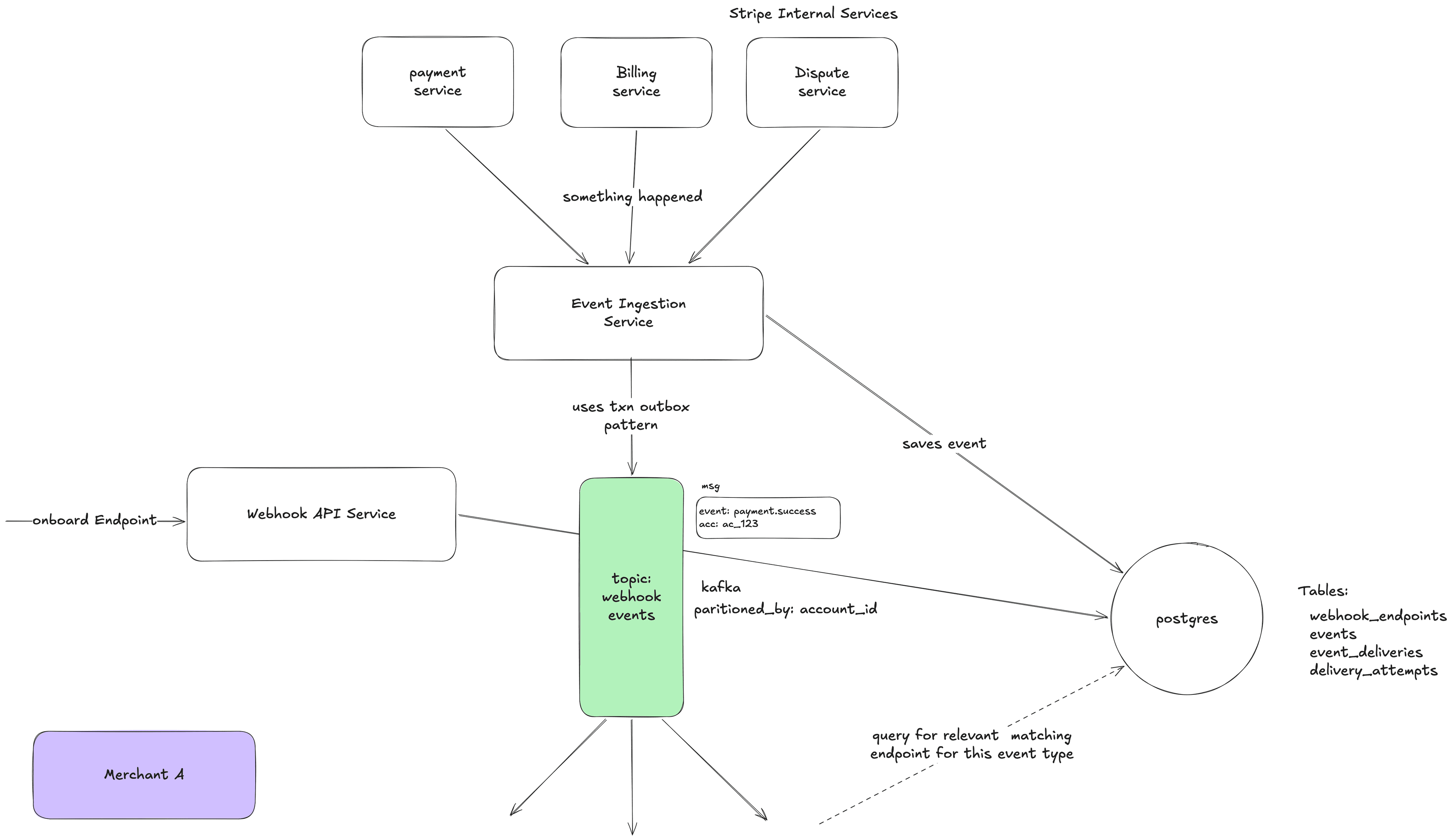
Let's say you are Stripe. You process payments for millions of businesses. When a customer pays $30 on CoolShirts.com, the actual card charge happens on your servers, not on CoolShirts' server. But CoolShirts needs to know the payment succeeded so they can:
- Mark the order as "paid"
- Send a confirmation email to the customer
- Start shipping the T-shirt
The fundamental question is: How does CoolShirts' server find out what happened on Stripe's servers? There are three approaches, and understanding why the first two fail is key to understanding why webhooks exist.
Part 1: Approaches
1.1 Approach 1: Synchronous Response (Not Enough)
When the customer clicks "Pay", CoolShirts' frontend talks to Stripe's API:
- CoolShirts Frontend → Stripe API: "Charge this card $30"
- Stripe API → CoolShirts Frontend: "Done! Payment succeeded."
- CoolShirts Frontend → CoolShirts Backend: "Payment succeeded, mark order as paid"
This works for the happy path. But here's where it breaks:
Problem 1: Asynchronous payment methods. Not all payments are instant. Bank transfers, SEPA debits, Boleto (Brazil) — these take hours or days. The API can only say "Payment initiated" not "Payment succeeded." Someone needs to tell CoolShirts when the money actually arrives. Days later.
Problem 2: Events that happen AFTER the payment. A customer disputes a charge 30 days later. A subscription renews automatically. A payout lands in the merchant's bank account. None of these are triggered by CoolShirts making an API call — they just happen on Stripe's side. CoolShirts' server has no idea.
Problem 3: Reliability. What if CoolShirts' frontend crashes right after the payment? The charge went through, but CoolShirts never recorded it. The customer got charged, but no T-shirt ships. Disaster.
So synchronous responses are not enough. We need a way to push information to CoolShirts' server after the fact, reliably.
1.2 Approach 2: Polling (Works But Terrible)
CoolShirts' server can ask Stripe periodically: "Did anything happen?"
Every 30 seconds:
CoolShirts → Stripe: GET /v1/events?since=last_check
Stripe → CoolShirts: [list of events since last check]
This works! But at scale, it's terrible:
- Wasted resources: 99% of the time, nothing happened. You're making millions of API calls that return empty results.
- Latency: If you poll every 30 seconds, you learn about events up to 30 seconds late. If you poll every 5 seconds, you waste 6x more resources but it's still not real-time.
- Scaling math: Stripe has ~1 million active businesses. If each polls every 10 seconds, that's 100,000 requests per second just for polling. Most return nothing. That's an absurd waste of server capacity.
- Rate limiting conflicts: Those polling requests eat into the merchant's API rate limit, taking away capacity from actually useful API calls.
1.3 Approach 3: Webhooks (The Solution)
Instead of CoolShirts asking Stripe "did anything happen?", CoolShirts tells Stripe:
Now the flow is:
- Customer pays $30
- → Stripe processes the payment
- → Stripe sees: "CoolShirts has a webhook registered for payment_intent.succeeded"
- → Stripe sends HTTP POST to https://coolshirts.com/stripe-webhooks with all the payment details
- → CoolShirts' server receives it, marks the order as paid, ships the T-shirt
Benefits:
- No wasted calls. Stripe only calls when something actually happened.
- Near real-time. CoolShirts knows within seconds.
- Scales beautifully. Stripe only makes HTTP calls to merchants who actually have events. No idle polling.
- Works for async events. Disputes, subscription renewals, payouts — all pushed automatically.
The trade-off: The complexity moves to Stripe's side. Now Stripe needs a system that can:
- Reliably deliver millions of HTTP calls per day
- Handle merchant servers being down
- Retry failed deliveries
- Not let one broken merchant affect others
- Secure the deliveries so they can't be faked
That system is what we're designing. The Webhook Delivery System.
Part 2: Functional Requirements
Let's define exactly what this system needs to do. I'll explain the why behind each requirement.
2.1 Endpoint Registration
What: Merchants can register one or more URLs where they want to receive webhooks. They can also specify which event types they care about.
Why: A T-shirt shop doesn't care about invoice.upcoming events (that's for subscription businesses). Letting them filter reduces noise and reduces our delivery load. Multiple endpoints let them send different events to different systems — one URL for their order management system, another for their analytics pipeline.
Details:
- A merchant can have up to ~16 endpoints (reasonable limit)
- Each endpoint has a list of event types (supports wildcards like payment_intent.*)
- Each endpoint gets its own unique secret key for signature verification
- Endpoints can be enabled/disabled without deleting them
- Each endpoint is pinned to an API version — this determines the format of the event payload
2.2 Event Generation
What: When something significant happens inside Stripe's systems (payment succeeds, subscription cancels, dispute created), an Event object is created.
Why: The Event is the source of truth — an immutable record of what happened. It's created once and never modified. This is important because we might need to deliver it multiple times (retries), show it in the dashboard, or let the merchant fetch it via API.
Details:
- Events are generated by internal services (Payment Service, Billing Service, etc.)
- Each event has a globally unique ID (e.g., evt_1a2b3c)
- Events contain the full snapshot of the object at the time the event occurred — not just "payment succeeded" but the entire payment object with amount, currency, status, metadata, etc.
- Events are immutable — once created, they never change
- Events are retained for 30 days (merchants can fetch them via API for reconciliation)
2.3 Event Delivery
What: When an event is created, the system matches it against all registered endpoints, and delivers it via HTTP POST to each matching endpoint.
Why: This is the core functionality. Without this, we just have a database of events that nobody knows about.
Details:
- Delivery is an HTTP POST with a JSON body
- The body is the full event object
- The request includes a Stripe-Signature header for security
- We consider the delivery successful if the merchant responds with any HTTP 2xx status code within 20 seconds
- Any other response (3xx, 4xx, 5xx, timeout, connection error) is a failure
2.4 Retry Logic
What: When a delivery fails, we automatically retry it with increasing delays, up to 72 hours.
Why: Merchant servers go down all the time. Deploys, outages, misconfigurations. Most are temporary. If we just gave up after the first failure, merchants would lose critical events. But we can't retry forever — at some point, we need to give up and tell the merchant something is wrong.
Details:
- Retry schedule: immediate, then ~1 min, ~5 min, ~30 min, ~2 hrs, ~5 hrs, ~10 hrs, ~18 hrs...
- Total retry window: 72 hours
- After all retries are exhausted, the event delivery is marked as "failed"
- Each retry attempt is logged independently
2.5 Delivery Logs
What: Merchants can see a log of every delivery attempt — what was sent, what was received, when, and whether it succeeded.
Why: When a webhook isn't working, the merchant needs to debug. "Did Stripe send it? What was the response? Did my server return a 500?" Without delivery logs, every issue becomes a support ticket. With them, merchants can self-serve.
Details:
- Show: timestamp, event type, endpoint URL, HTTP status code, response body (truncated), duration
- Retention: 15-30 days
- Available via API and dashboard
2.6 Manual Retry
What: Merchants can manually trigger re-delivery of any event from the dashboard or API.
Why: Maybe they fixed a bug and want to re-process all the events that failed while the bug was live. Without this, they'd have to call support.
2.7 Endpoint Health Monitoring
What: The system tracks the success rate of each endpoint and automatically disables endpoints that have been failing for too long.
Why: An abandoned endpoint (merchant shut down, URL changed) will fail forever. Every retry wastes resources. Auto-disabling prevents this. We also email the merchant so they know something is wrong.
2.8 Signature Verification
What: Every webhook delivery includes a cryptographic signature that the merchant can verify.
Why: Without this, anyone who knows the merchant's webhook URL can send fake events. A hacker could send a fake payment_intent.succeeded event and the merchant's system would ship products without actually getting paid.
Part 3: Non-Functional Requirements
These are the quality attributes that make the system suitable for production at Stripe's scale.
3.1 Durability — No Event Loss
This is the most important non-functional requirement. Let me explain why with a story. CoolShirts has a customer who buys a $500 jacket. The payment succeeds. But if we lose the payment_intent.succeeded event, CoolShirts never ships the jacket. The customer got charged $500 and got nothing. That's fraud from the customer's perspective. That's a chargeback. That's a lost merchant for Stripe.
One lost event = real money lost for a real business. So we design for zero event loss:
- Events are persisted to a durable database before we attempt delivery
- We use a durable message queue (Kafka) that replicates data across multiple machines
- Even if all our delivery workers crash, the events are safe in the database and queue
- A background sweeper catches any events that fell through the cracks
3.2 At-Least-Once Delivery
We guarantee every event is delivered at least once. We cannot guarantee exactly once. Here's the fundamental reason:
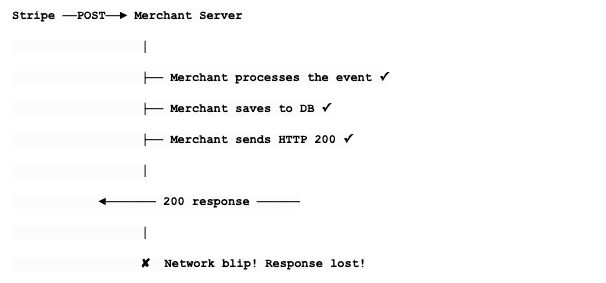
From Stripe's perspective, we never got the 200. We think it failed. So we retry. The merchant gets the event twice. We cannot solve this without a two-phase commit protocol between our server and the merchant's server, which is impractical (we don't control their code). So instead:
- We tell merchants: "You may receive duplicates."
- We provide a stable event.id that never changes across retries.
- Merchants should check: "Have I already processed evt_abc123?" If yes, skip it.
This is called idempotent processing, and it's the industry standard for webhooks.
3.3 Low Latency
From the moment an event occurs to the first delivery attempt: p50 < 1 second, p99 < 5 seconds. Why? Because some merchants use webhooks for time-sensitive actions. If a payment succeeds, the customer is staring at a loading screen waiting for confirmation. The merchant needs to know ASAP.
3.4 Endpoint Isolation (No Noisy Neighbors)
This is a huge deal and worth explaining in detail. Stripe has ~1 million merchants. Some are sophisticated companies with fast, reliable servers. Some are a solo developer with a $5/month VPS that goes down every Tuesday. If CoolShirts' server takes 20 seconds to respond to every webhook, that must NOT make deliveries to FancyHats.com slower. If BrokenStartup.io's server is completely dead, that must NOT consume resources that could be used for healthy endpoints.
Without isolation: Imagine 10 delivery workers. 8 of them are stuck waiting 20 seconds for BrokenStartup's server to timeout. Only 2 workers are available for the other 999,999 merchants. Everything is slow for everyone.
With isolation: BrokenStartup gets its own "lane." It can be as slow as it wants. Other merchants are unaffected.
3.5 Horizontal Scalability
The system must handle traffic spikes gracefully. Black Friday might bring 10x normal traffic. We should be able to add more machines to handle the load without architectural changes.
3.6 Observability
At Stripe's scale, "something is broken" is not helpful. We need:
- Per-endpoint success rates and latency percentiles
- Queue depth metrics (is work piling up?)
- Alerting when an endpoint starts failing
- Distributed tracing (follow one event from creation to delivery)
- Dashboard for merchants to see their webhook health
Part 4: Core Entities — In Depth
Let me now walk through each entity in detail, explaining not just what fields they have, but why each field exists.
4.1 WebhookEndpoint
This represents a registered destination URL for a specific merchant.
1WebhookEndpoint:
2  id: "we_001"                     ← Unique identifier, used in APIs
3  account_id: "acct_coolshirts"    ← Which merchant owns this
4  url: "https://coolshirts.com/stripe-webhooks"  ← Where to POST
5  enabled_events: [                ← What events they want
6    "payment_intent.succeeded",
7    "payment_intent.payment_failed",
8    "charge.refunded"
9  ]
10  status: "enabled"                ← enabled | disabled
11  secret: "whsec_abc123..."       ← Used to sign deliveries (unique per endpoint)
12  api_version: "2024-01-01"       ← Determines payload format
13  description: "Main production webhook"
14  created_at: "2026-01-15T10:00:00Z"
15  metadata: { "env": "production" }
16
Field-by-field justification:
- id: We need a way to reference this endpoint in APIs, logs, and internally.
- account_id: When an event occurs, we need to look up "all endpoints belonging to this merchant." This field enables that query.
- url: The actual HTTP endpoint to POST to. Must be HTTPS. We validate it's not pointing to internal IPs (security).
- enabled_events: If a merchant only cares about payments, we shouldn't send them invoice events. This reduces noise for the merchant and delivery load for us. Supports wildcards: "" means all events, "payment_intent." means all payment_intent events.
- status: Lets merchants temporarily disable an endpoint without deleting it (and losing the configuration). Also used by our system to auto-disable failing endpoints.
- secret: Each endpoint gets its own signing secret. Why per-endpoint and not per-account? Because a merchant might have one endpoint managed by their development team and another managed by a third-party integration. Each team should have their own secret. If one is compromised, they can rotate it without affecting the other.
- api_version: Stripe's API changes over time. An event's payload format might look different in API version "2024-01-01" vs "2025-01-01". By pinning each endpoint to a version, we ensure existing integrations don't break when Stripe updates its API. We transform the event payload to match the endpoint's version before delivering.
- metadata: A flexible JSON field for merchants to store their own key-value data. Stripe does this on almost every resource.
4.2 Event
This represents an immutable fact that something happened.
1Event:
2  id: "evt_abc123"                   ← Globally unique, stable across retries
3  type: "payment_intent.succeeded"   ← What happened
4  account_id: "acct_coolshirts"      ← On whose account
5  api_version: "2026-01-01"          ← Latest version at time of creation
6  data: {                            ← Full snapshot of the object
7    "object": {
8      "id": "pi_xyz789",
9      "object": "payment_intent",
10      "amount": 3000,
11      "currency": "usd",
12      "status": "succeeded",
13      "customer": "cus_abc",
14      "metadata": { "order_id": "order_123" }
15    },
16    "previous_attributes": {         ← What changed (for update events)
17      "status": "requires_payment_method"
18    }
19  }
20  livemode: true                     ← Live vs test mode
21  created_at: "2026-02-14T10:00:00Z"
22  pending_webhooks: 2                ← How many endpoints need this event
23
Why the full snapshot in data.object?
This is a critical design choice. We have two options:
Option A — Reference only: Send just the event type and the object ID. Merchant fetches the full data via API.
1{ "type": "payment_intent.succeeded", "data": { "object_id": "pi_xyz789" } }
2
Option B — Full snapshot: Send the complete object as it was at the moment of the event.
1{ "type": "payment_intent.succeeded", "data": { "object": { ...full payment intent... } } }We chose Option B. Here's why:
- Reduced API load. If every webhook triggers an API call to fetch the full object, you've just turned webhooks back into a polling-like pattern. Millions of webhooks = millions of extra API calls.
- Works even if the object no longer exists. If a customer is deleted and then a webhook about that customer is retried, the merchant can't fetch the customer via API anymore. But the webhook payload still has all the data.
- Point-in-time accuracy. The object might have changed between when the event occurred and when the merchant processes the webhook. The snapshot shows exactly what the object looked like at the moment of the event.
- Simpler for merchants. They get everything they need in one HTTP request.
The previous_attributes field is clever — for update events, it shows what changed. So payment_intent.updated includes the new state in data.object and the old values of changed fields in data.previous_attributes. The merchant can see exactly what changed without having to track state themselves.
4.3 EventDelivery
This is the task of delivering one event to one endpoint. It's the bridge between an Event and a WebhookEndpoint.
1EventDelivery:
2  id: "ed_001"
3  event_id: "evt_abc123"           ← Which event
4  endpoint_id: "we_001"            ← Which endpoint
5  status: "pending"                ← pending | succeeded | failed | expired
6  attempt_count: 0                 ← How many times we've tried
7  max_attempts: 15                 ← When to give up
8  next_retry_at: null              ← When to try next (null = try now)
9  created_at: "2026-02-14T10:00:00Z"
10  last_attempted_at: null
11
Why does this entity exist separately from Event?
Consider this scenario: CoolShirts has TWO webhook endpoints:
- we_001: https://coolshirts.com/webhooks (their main server)
- we_002: https://slack-bot.coolshirts.com/stripe (their Slack integration)
When evt_abc123 occurs, we create TWO EventDeliveries:
- EventDelivery ed_001: evt_abc123 → we_001 (main server)
- EventDelivery ed_002: evt_abc123 → we_002 (Slack bot)
Now, the main server is healthy and responds 200 instantly. But the Slack bot is down.
- ed_001: status = succeeded ✓ (after 1 attempt)
- ed_002: status = pending ✗ (retrying...)
If we didn't have EventDelivery as a separate entity, how would we track that the event was successfully delivered to one endpoint but not the other? We'd need to cram that state into the Event itself, which would get messy fast with multiple endpoints. EventDelivery gives us independent state tracking per endpoint.
4.4 DeliveryAttempt
This is a log of one individual HTTP call.
1DeliveryAttempt:
2  id: "da_001"
3  event_delivery_id: "ed_002"       ← Which EventDelivery this is for
4  attempt_number: 1                  ← 1st attempt, 2nd attempt, etc.
5
6  # What we sent:
7  request_url: "https://slack-bot.coolshirts.com/stripe"
8  request_headers: {
9    "Content-Type": "application/json",
10    "Stripe-Signature": "t=17000,v1=abc..."
11  }
12  request_body: "{ ... event JSON ... }"
13
14  # What we got back:
15  response_status_code: 503          ← Service Unavailable
16  response_headers: { "Retry-After": "60" }
17  response_body: "Service temporarily unavailable"  ← Truncated to 1KB
18
19  # Metadata:
20  status: "failed"
21  error_message: null                ← For network errors: "Connection refused", "DNS resolution failed", etc.
22  duration_ms: 2150                  ← How long the HTTP call took
23  created_at: "2026-02-14T10:00:01Z"
24
Why keep this separately from EventDelivery?
Because one EventDelivery might have 15 attempts over 72 hours. Each attempt has its own response code, response body, timing, and error. The merchant needs to see ALL of these to debug:
- Attempt 1 (10:00 AM): 503 Service Unavailable - "deploying"
- Attempt 2 (10:01 AM): 503 Service Unavailable - "deploying"
- Attempt 3 (10:06 AM): 500 Internal Server Error - "null pointer at line 42"
- Attempt 4 (10:36 AM): 200 OK ✓ - merchant fixed the bug!
Without DeliveryAttempt as a separate entity, we'd only see the final state, not the journey. This history is invaluable for debugging. Why truncate the response body? A merchant's server might accidentally return a 10MB error page as the response body. We don't want to store that. We truncate to ~1KB — enough to see error messages, not enough to blow up our storage.
Part 5: API Design — In Depth
5.1 Webhook Endpoint CRUD
Create an endpoint:1POST /v1/webhook_endpoints
2Request:
3{
4 "url": "https://coolshirts.com/stripe-webhooks",
5 "enabled_events": ["payment_intent.succeeded", "charge.refunded"],
6 "description": "Production webhook",
7 "api_version": "2026-01-01" ← optional, defaults to account's version
8}
9Response (201 Created):
10{
11 "id": "we_1a2b3c",
12 "object": "webhook_endpoint",
13 "url": "https://coolshirts.com/stripe-webhooks",
14 "enabled_events": ["payment_intent.succeeded", "charge.refunded"],
15 "secret": "whsec_live_abc123def456...", ← ONLY shown here, on creation
16 "status": "enabled",
17 "api_version": "2026-01-01",
18 "description": "Production webhook",
19 "created": 1739520000,
20 "livemode": true,
21 "metadata": {}
22}
23Important: The secret is only returned once, at creation time. If the merchant loses it, they must roll it (which generates a new one). This is a security best practice — secrets should be visible as briefly as possible.
URL validation on creation:
- Must be HTTPS (we refuse to send financial data over unencrypted HTTP)
- Must not point to private/internal IPs (10.x.x.x, 127.0.0.1, 192.168.x.x) — this prevents SSRF attacks where someone tricks Stripe's servers into calling internal services
- Must not point to Stripe's own domains (prevents loops)
- DNS must resolve
1PATCH /v1/webhook_endpoints/we_1a2b3c
2Request:
3{
4  "enabled_events": ["payment_intent.succeeded", "charge.refunded", "charge.dispute.created"],
5  "disabled": false
6}
7Response (200 OK):
8{
9  "id": "we_1a2b3c",
10  "enabled_events": ["payment_intent.succeeded", "charge.refunded", "charge.dispute.created"],
11  "status": "enabled",
12  ...
13}
141DELETE /v1/webhook_endpoints/we_1a2b3c
2Response (200 OK):
3{
4 "id": "we_1a2b3c",
5 "object": "webhook_endpoint",
6 "deleted": true
7}
8When deleted, we stop all pending deliveries for this endpoint. Events already in-flight (currently being POSTed) will finish but won't be retried on failure.
List endpoints:1GET /v1/webhook_endpoints?limit=10
2Response:
3{
4 "object": "list",
5 "data": [
6 { "id": "we_001", "url": "https://...", ... },
7 { "id": "we_002", "url": "https://...", ... }
8 ],
9 "has_more": false
10}
115.2 Events API
1GET /v1/events?type=payment_intent.succeeded&created[gte]=1739520000&limit=25
2Response:
3{
4  "object": "list",
5  "data": [
6    {
7      "id": "evt_abc123",
8      "type": "payment_intent.succeeded",
9      "data": { "object": { ... } },
10      "created": 1739520000,
11      "pending_webhooks": 0
12    },
13    ...
14  ],
15  "has_more": true
16}
17
Merchants use this for reconciliation — "show me all payment events in the last 24 hours so I can verify my system processed all of them." This is the safety net when webhooks aren't enough.
Retrieve a single event:
1GET /v1/events/evt_abc1235.3 The Webhook Payload (What the Merchant's Server Receives)
This is what Stripe sends TO the merchant. This is the most important "API" in the entire system.
1POST https://coolshirts.com/stripe-webhooks
2Headers:
3  Content-Type: application/json
4  Stripe-Signature: t=1739520000,v1=5257a869e7ecebeda32affa62cdca3fa51cad7e77a0e56ff536d0ce8e108d8bd
5  User-Agent: Stripe/1.0 (+https://stripe.com/docs/webhooks)
6Body:
7{
8  "id": "evt_abc123",
9  "object": "event",
10  "api_version": "2026-01-01",
11  "created": 1739520000,
12  "type": "payment_intent.succeeded",
13  "livemode": true,
14  "pending_webhooks": 1,
15  "data": {
16    "object": {
17      "id": "pi_xyz789",
18      "object": "payment_intent",
19      "amount": 3000,
20      "currency": "usd",
21      "status": "succeeded",
22      "payment_method": "pm_card_visa",
23      "customer": "cus_abc",
24      "metadata": {
25        "order_id": "order_123"
26      }
27    }
28  },
29  "request": {
30    "id": "req_abc123",
31    "idempotency_key": null
32  }
33}
34
The Stripe-Signature header explained:
Stripe-Signature: t=1739520000,v1=5257a869...
- t = timestamp when the signature was generated (Unix epoch)
- v1 = the HMAC-SHA256 signature
The merchant verifies it like this:
1import hmac
2import hashlib
3def verify_webhook(payload_body, signature_header, endpoint_secret):
4    # Parse the header
5    parts = dict(pair.split('=', 1) for pair in signature_header.split(','))
6    timestamp = parts['t']
7    received_signature = parts['v1']
8
9    # Reconstruct the signed message
10    signed_message = f"{timestamp}.{payload_body}"
11
12    # Compute expected signature
13    expected_signature = hmac.new(
14        endpoint_secret.encode(),
15        signed_message.encode(),
16        hashlib.sha256
17    ).hexdigest()
18
19    # Compare (timing-safe)
20    if not hmac.compare_digest(expected_signature, received_signature):
21        raise ValueError("Invalid signature")
22
23    # Check timestamp to prevent replay attacks
24    if abs(time.time() - int(timestamp)) > 300:  # 5 minutes
25        raise ValueError("Timestamp too old")
26
27    return True
28
Why include the timestamp in the signed message? Without it, an attacker who intercepts a valid webhook can replay it days later. By including the timestamp and checking that it's recent (within 5 minutes), we prevent replay attacks.
Success criteria for delivery:
- HTTP 2xx response within 20 seconds = success
- HTTP 3xx (redirect) = failure (we don't follow redirects — security risk)
- HTTP 4xx = failure (but may not be retried for certain 4xx codes)
- HTTP 5xx = failure (will be retried)
- Timeout (>20s) = failure (will be retried)
- Connection refused / DNS failure = failure (will be retried)
Part 6: High-Level Architecture — In Depth
Let me walk through the system component by component, explaining what each does, why it exists, and how it connects to the others.
6.1 The Full Picture
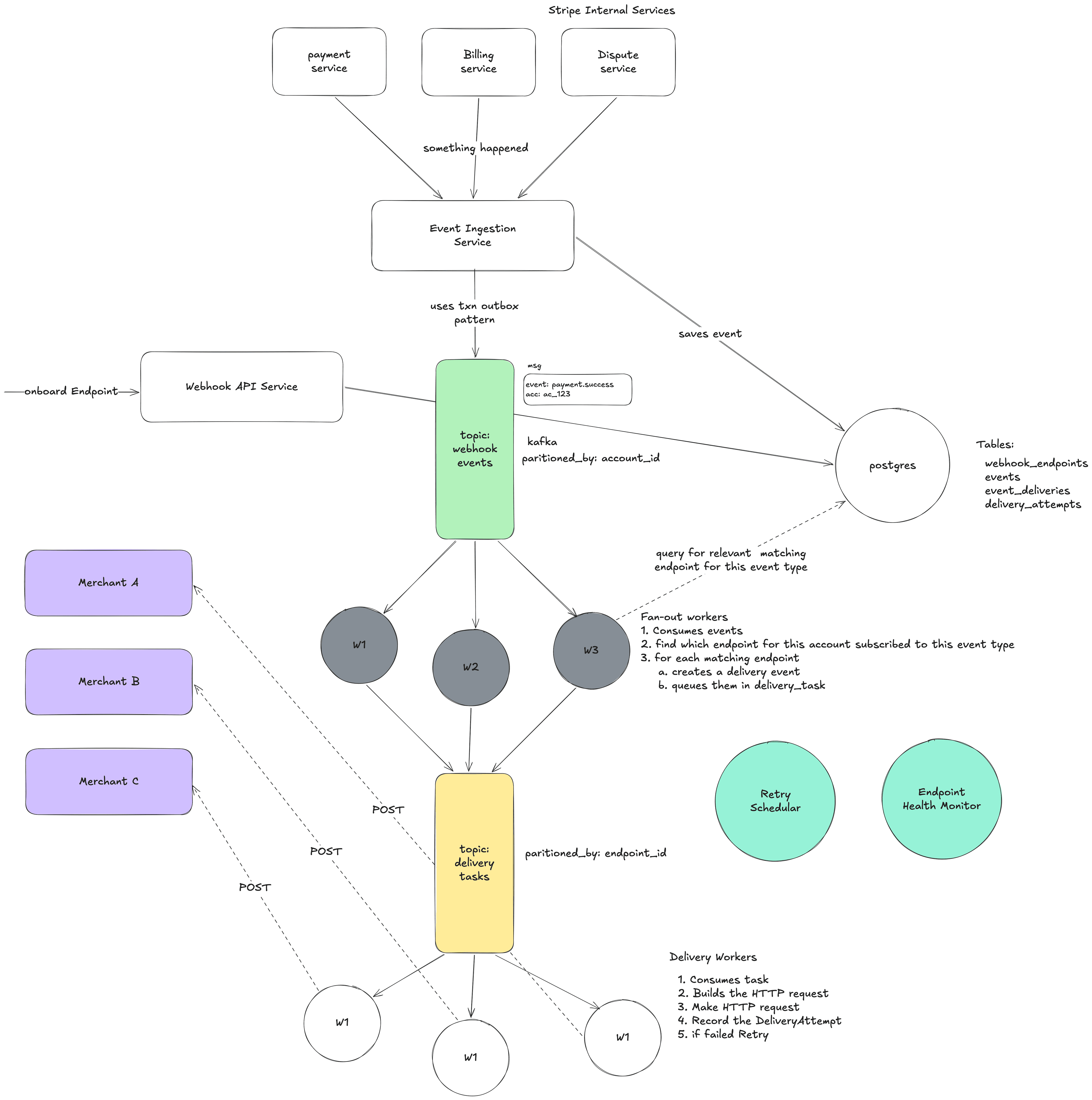
6.2 Component: Event Ingestion Service
What it does: Receives notifications from internal Stripe services that something happened, and turns them into Event objects.
How events reach it: Internal services publish messages to an internal event bus or call an internal API:
PaymentService → Internal Event Bus → Event Ingestion Service
What it does step by step:
- Receives message: "Payment pi_xyz789 for account acct_coolshirts just succeeded"
- Validates: Is this a known event type? Is the account valid? Is the payload well-formed?
- Generates a unique ID: evt_abc123
- Builds the full Event object with the snapshot of the payment intent
- Persists the Event to the database (this is crucial — it's now durable)
- Publishes the Event to Kafka (topic: webhook-events, partition key: account_id)
- Returns success to the internal service
Why persist to DB before publishing to Kafka? Because if we only publish to Kafka and the Kafka write fails, the event is lost. If we write to the DB first, we have a permanent record. A background sweeper can find events that were written to DB but not successfully published to Kafka and re-publish them.
Why partition Kafka by account_id? All events for the same account go to the same partition. This means they're processed in order within that account. So payment_intent.created is processed before payment_intent.succeeded for the same payment. This helps with ordering (though ordering is still best-effort).
6.3 Component: Fan-Out Service / Workers
What it does: Takes one event and figures out which endpoints should receive it. Creates a delivery task for each one.
Step by step:
- Consumes event evt_abc123 (type: payment_intent.succeeded, account: acct_coolshirts) from Kafka
- Queries: "Give me all enabled webhook endpoints for acct_coolshirts where enabled_events includes payment_intent.succeeded or payment_intent. or "
- Finds two endpoints: we_001 and we_002
- Creates two EventDelivery records in the database:
- ed_001: event=evt_abc123, endpoint=we_001, status=pending
- ed_002: event=evt_abc123, endpoint=we_002, status=pending
- Publishes two delivery tasks to Kafka (topic: delivery-tasks)
- Task for ed_001 goes to partition for we_001
- Task for ed_002 goes to partition for we_002
Why is this a separate service and not part of the Event Ingestion Service?
Separation of concerns:
- Event Ingestion is about capturing facts quickly and durably
- Fan-out is about routing — which endpoints match which events
- If fan-out is slow (maybe endpoint lookup is complex), it shouldn't slow down event ingestion
- They can scale independently: maybe we need more ingestion capacity but not more fan-out capacity, or vice versa
Caching endpoint subscriptions: Looking up endpoints for every single event would hammer the database. Instead, we cache the endpoint configuration in memory (or Redis), with cache invalidation when endpoints are created/updated/deleted. This lookup happens millions of times per day; it needs to be fast.
6.4 Component: Delivery Workers
This is the most complex and most important component. It actually makes the HTTP calls to merchant servers.
Step by step for one delivery task:
- Consume delivery task from Kafka (event_delivery_id: ed_001)
- Load the EventDelivery from DB (to get the latest state — maybe it was cancelled)
- Load the Event from DB (to get the payload)
- Load the WebhookEndpoint from DB/cache (to get the URL, secret, API version)
- Transform the event payload to match the endpoint's API version (if needed)
- Compute the HMAC-SHA256 signature using the endpoint's secret
- Make the HTTP POST:
- POST https://coolshirts.com/stripe-webhooks
- Headers: Content-Type: application/json, Stripe-Signature: t=...,v1=...
- Body: { "id": "evt_abc123", ... }
- Timeout: 20 seconds
- Record the DeliveryAttempt with the response status code, body, duration
- If 2xx response:
- Update EventDelivery status to "succeeded"
- Done!
- If failure (non-2xx, timeout, connection error):
- Update EventDelivery: increment attempt_count, set next_retry_at
- The Retry Scheduler will pick it up later
Why 20-second timeout?
- Too short (5s): Many legitimate servers need more time, especially if they do database writes before responding
- Too long (60s): A stuck connection ties up a worker for a full minute, wasting resources
- 20 seconds is the sweet spot: gives merchants enough time to process, doesn't waste resources on truly dead servers
How delivery workers handle concurrent connections:
Workers use async I/O (like epoll/kqueue, or libraries like Netty/Tokio). Instead of dedicating one thread per HTTP call (and that thread sitting idle waiting for a response), one thread can manage thousands of concurrent HTTP connections. When one connection is waiting for a response, the thread works on other connections. This means a single delivery worker process can handle hundreds or thousands of simultaneous deliveries to different endpoints.
6.5 Component: Retry Scheduler
What it does: Finds EventDeliveries that need to be retried and re-enqueues them.
How it works: Every few seconds, it runs a query:
1SELECT * FROM event_deliveries WHERE status = 'pending' AND next_retry_at <= NOW() AND next_retry_at IS NOT NULL ORDER BY next_retry_at ASC LIMIT 1000
For each result, it publishes a delivery task to the delivery-tasks Kafka topic.
Why not use a delayed message queue instead of a scheduler? Some queue systems (like SQS or RabbitMQ) support delayed messages — "deliver this message to a consumer after 5 minutes." We could use this instead of a separate scheduler.
- Database + Scheduler: DB is the source of truth. Easy to query/modify retries. Easy to cancel. Polling the DB adds load. Small delay (polling interval).
- Delayed Queue: More efficient. No polling. Exact timing. If we need to cancel a retry, we can't easily remove a message from a queue. Queue is not easily queryable. If the queue loses data, retries are lost.
- Hybrid: Best of both worlds, but more complex.
The hybrid approach is ideal: Store retry state in the DB (durability + queryability), use delayed queue for efficiency. The scheduler acts as a sweeper that catches anything the queue missed.
Retry timing — exponential backoff with jitter:
- Attempt 1: Immediate (0 min)
- Attempt 2: ~1 min (base: 1 min, jitter: ±30s)
- Attempt 3: ~5 min (base: 5 min, jitter: ±2.5 min)
- Attempt 4: ~30 min (base: 30 min, jitter: ±15 min)
- Attempt 5: ~2 hrs (base: 2 hr, jitter: ±1 hr)
- Attempt 6: ~5 hrs
- Attempt 7: ~10 hrs
- Attempt 8: ~18 hrs
- ...continuing up to 72 hours total...
Why exponential? If a server has been down for 1 hour, checking every 1 minute is pointless. It just wastes 60 calls that will all fail. Spacing retries out farther gives the merchant time to fix the issue.
Why jitter (randomness)? Imagine a big Stripe outage causes 1 million deliveries to fail at 10:00 AM. Without jitter, all 1 million retry at 10:01 AM. Then all at 10:06 AM. These synchronized waves are called a thundering herd and can overload the system. Jitter spreads retries randomly across the window, smoothing out the load.
6.6 Component: Endpoint Health Monitor
What it does: Watches delivery success rates per endpoint and takes action when endpoints are unhealthy.
State machine:
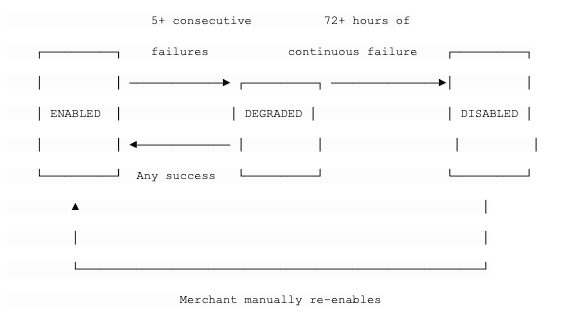
- ENABLED: Normal operation. Deliver at full speed.
- DEGRADED: Something is wrong. We still try to deliver, but:
- We send an email to the merchant: "Your webhook endpoint https://... is failing. Please check."
- We might reduce delivery concurrency to this endpoint
- Dashboard shows a warning
- DISABLED: We've been trying for 72 hours and nothing works. We stop trying.
- Email to merchant: "Your webhook endpoint has been disabled due to sustained failures."
- No more delivery attempts for this endpoint
- Merchant must fix the issue and manually re-enable from the dashboard
Why auto-disable? A dead endpoint wastes retry resources forever. Across millions of merchants, many endpoints become abandoned (company shuts down, developer deletes the server but forgets to remove the webhook). Without auto-disable, we'd accumulate more and more dead endpoints, each consuming retry resources indefinitely.
6.7 Component: Database
Schema design considerations:
Events table — This is append-only and grows forever. Key considerations:
- Partitioned by created_at (time-based partitioning) — old events can be archived or moved to cold storage
- Indexed on (account_id, created_at) for the "list events" API
- Indexed on (account_id, type, created_at) for filtered queries
- 30-day retention for online access, then archived
EventDeliveries table — This is the hot table. Queries hitting it all the time:
- The retry scheduler queries: WHERE status = 'pending' AND next_retry_at <= NOW()
- The dashboard queries: WHERE endpoint_id = ? ORDER BY created_at DESC
- Indexed on (status, next_retry_at) for retry scheduler
- Indexed on (endpoint_id, created_at) for dashboard
DeliveryAttempts table — Extremely high write volume (every HTTP call creates a row). Read only for debugging.
- Write-optimized
- Indexed on (event_delivery_id) to fetch all attempts for one delivery
- Can be in a separate database or storage system if needed
Scaling the database: At Stripe's scale (millions of events per day), a single PostgreSQL instance won't cut it. Options:
- Vitess (which Stripe actually uses): MySQL-compatible horizontal sharding
- Shard by account_id: All data for one merchant is on the same shard, which makes most queries efficient (they filter by account_id)
- Separate read replicas for the API/dashboard queries, so they don't compete with writes
This article is WIP.
References: