
Inventory management is one of the interesting problems in distributed systems. Let’s begin by defining what inventory management is. At its core, an inventory management system tracks products from the moment they enter a warehouse until they’re sold.
Let’s take a real world example, say you are a seller who wants to sell books on your platform, when somebody comes to your website they should be able to search for the book they are looking for, well how are they gonna find out which book you already have?
You need to store it somewhere right? You need to store all the information from the title of the book, to the quantity that you currently possess. Where do you think you are gonna keep it? And say somebody bought it, are you going to decrease the quantity of that book? What if their payment fails?
All these things are part of what an inventory management system does.
Odoo is an existing inventory management system that also tells you how much product you need to hoard based on supply and demand.
If we have to build our own inventory management system, what do you think our functional requirement should look like?
Functional Requirement
- The system should be able to let us onboard new warehouses. It is a physical place where you store all your inventory.
- The system should be able to let us add products and their quantity.
- The system should be able to help us reserve and release a product depending upon whether an order gets successful or failed.
We can summarise the above requirement into the following:
- Warehouse Management: Add/view warehouses.
- Product Management: Add products to a warehouse with a specific quantity.
- Search Management: Easily search the products using their name or description.
- Inventory Control:
- Reserve a stock for an order. (by stock we are not referring to financial instruments but products).
- Release reserved stock if an order fails.
- Fulfil (deduct) stock when an order is successful.
The above requirement takes care of both the supply as well as the demand side. The supply side takes care of onboarding the products whereas the demand side takes care of deboarding the products (consumed).
Of course, as our non-functional requirement, we would want to ensure that we don’t take more orders than what we have stocked (or in other words avoid double booking).
Verbs / Nouns
Taking into the above consideration, we can go ahead and design our low-level design. In order to do that we need to translate our requirements into the building blocks of our system: classes. Now there are two types of classes that we often see: verbs (service class) and nouns (model class).
The nouns (model) actually hold the data or represent the data, think of it as similar to what we are going to store in the DB. Whereas the verbs (service) class actually act upon that data to fulfill our business requirement.
Considering the above core requirements, we can have the following noun (model) classes:
Core Entities
Considering the above core requirements, we can have following noun (model) classes:
- Warehouse: the class holds all the key information of the warehouse, such as name, its location, etc.
- Product: this class holds all the static information about a product
- Inventory: this class links a specific product to a specific warehouse and track its unique stock levels (available and reserved).
- Order: this will hold the details about what items we ordered and their total cost that we paid.
- Cart: out of scope.
Following is an overview of what all noun classes we will be needing.
1class User {
2	int id;
3	... metadata (we are not concerned about the user here)
4}1class Warehouse {
2 int id;
3 String name;
4 String lat;
5 String long;
6}1class Product {
2 int id;
3 String name;
4 String description;
5 Category category;
6 double price; Currency currency;
7 ... metadata
8}1class Inventory {
2 int id;
3 int productId; (fk)
4 int warehouseId;
5 long available;
6 long reserved;
7}1class Order {
2 int id;
3 int userId;
4 List<OrderItem> orders;
5 double totalPrice;
6 Status orderStatus;
7}1class OrderItem {
2 int orderId;
3 int productId;
4 int quantity;
5 double priceAtPurchase;
6}Now, let’s come to the verbs, the classes that will be acting upon these noun classes. We can have a WarehouseService that will be responsible for onboarding or updating a warehouse. We can have aProductService which will be responsible for adding a product to our catalog, and finally an InventoryService which will be linking the product to a warehouse and its quantity. Additionally we can have SearchService which will talk to the ElasticSearch for the searching part. The ES can get the data to index on through CDC (change data capture) from postgres.
API Design
Let’s see how the client will interact with our microservices. We can make use of functional requirements to come up with our API Design. For example, the first requirement is that a user should be able to onboard a new warehouse. Which means we will require a CRUD operation for warehouse. We can create a microservice called Warehouse Service, which will be responsible for creating, updating or removing a warehouse.
To onboard a new warehouse we can hit the following API with the following request body
1POST /v1/warehouses1{
2 "name": "bangalore-sarjapura-warehouse",
3 "address": "sarjapura road, near salarpuria softzone",
4 "lat": "12.8576° N",
5 "long": "77.7864° E"
6}The above API can return us Optional<Warehouse>.
On similar lines, we can come up with the product APIs. The following call will land on to our ProductService.
1POST /v1/products1{
2 "name": "iPhone 17",
3 "description": "iPhone Air 256 GB: Thinnest iPhone Ever, 16.63 cm (6.5″) Display with Promotion up to 120Hz, Powerful A19 Pro Chip, Center Stage Front Camera, All-Day Battery Life; Space Black",
4 "price": 119000,
5 "currency": "INR",
6 "category": "mobile phones"
7}To search for a product, we can pass on the keyword as a query parameter and a cursor for pagination. Now this will get served from our SearchService to return blazingly fast results.
1GET /v1/products?keyword=iphone&cursor=12452To add anything to the cart, we can expose the following API. The server will identify the user’s specific cart via their authentication token (JWT). The below request will land onto the CartService.
1POST /v1/cart/items1{
2 "productId": "prod_1a2b3c",
3 "quantity": 2
4}Here is how the whole add/update items in cart works:
- The server gets the user's cart based on their auth token
- It checks if the productId is already in the cart
- If yes: it updates the quantity for that product to the new value (e.g. 2)
- If no: it adds the new product to the cart with the provided quantity
- If say, the client sends the quantity as 0, it would mean they are trying to remove it.
Now to view a cart, they can simply hit:
1GET /v1/cart/itemsThe above API will return us the following and the UI will render it.
1{
2    "id": "cart_xyz789",
3    "userId": "user_abc123",
4    "items": [
5        {
6            "productId": "prod_1a2b3c",
7            "name": "iPhone 17",
8            "quantity": 2,
9            "pricePerUnit": 119000,
10            "lineItemTotal": 238000
11        },
12        {
13            "productId": "prod_4d5e6f",
14            "name": "AirPods Pro 3",
15            "quantity": 1,
16            "pricePerUnit": 24900,
17            "lineItemTotal": 24900
18        }
19    ],
20    "subtotal": 262900,
21    "tax": 47322,
22    "total": 310222,
23    "currency": "INR"
24}
Let’s come to the most important API, the checkout API (or the buy). This api basically takes the cartId and then lands onto the CheckoutService. The CheckoutService calls the CartService to get the whole cartInfo from the cartId. Post that it validates and asks the InventoryService to basically reserve these products. TheInventoryService does the reserving of the product for you. This is the most critical API in our system, so it must be atomic and idempotent. We will learn more about it in a later section of the blog. For the time being, just assume that we will call this api for checking out.
1POST /v1/checkout?cartId={cartId}
2
Deep Dives
Now, let’s understand how we will be preventing overselling, what is the single most critical function we would need inside ourInventoryService?
How about a lock? that helps prevent the race conditions. How can we get a race condition in the first place?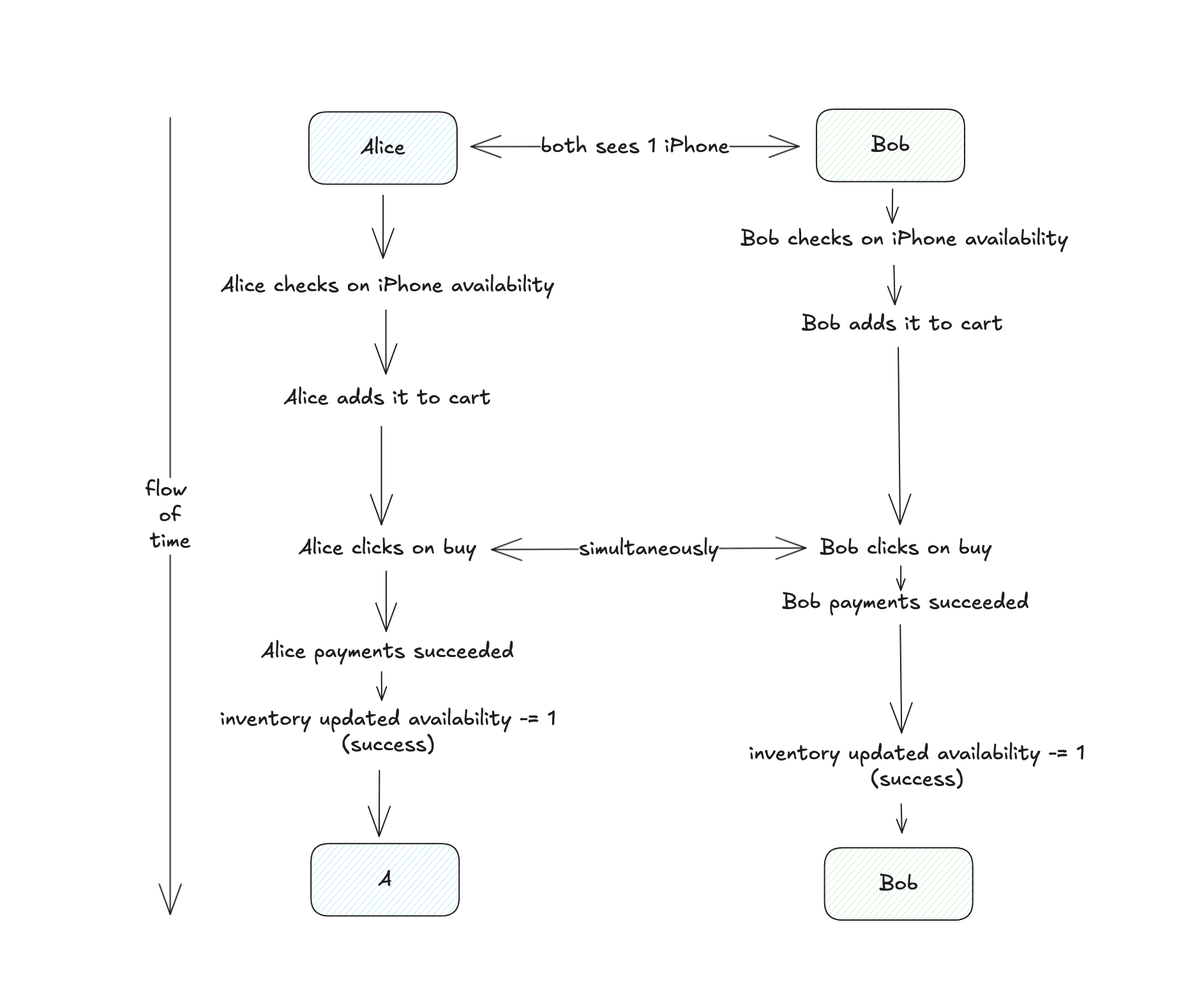
simulation of buy process
Say we only have one iPhone left and there are two buyers for it, they both added the iPhone in their cart, at this time everything is okay, because in Inventory we have one item left, and by just adding to cart doesn’t mean we will reserve it. Say they both clicked on buy, and they both saw that the iPhone quantity is 1, so they both paid for it. It is a race against time. Say Bob was fast because he had saved the card details, but Alicewas typing them out. So finally Bob got the iPhone, but Alice's money got deducted because at this time the order was already created. Now you, as the owner, have to go and say sorry to Alice and refund the amount.
You might be thinking okay, why not keep this operation in a synchronized method? And you might be right if we only have one server running, but in a distributed system there are multiple servers running the same code.A synchronized block on one server won’t lock the resource for other servers.
Let's look at the different locking mechanism by which we can avoid this issue.Pessimistic Locking
This type of locking basically locks the record as soon as someone is trying to update it. Others have to wait until the first user has released the lock. In case of MySQL, SELECT ... FOR UPDATE statement works by locking the rows returned by the selection query.
The pros of this approach is that it prevents the application from updating data that is being or has been changed. (like availableQuantity -= 1). The cons is that this approach is not scalable, if a transaction is locked for too long, other transactions cannot access the resource. This will result in significant impact.
Optimistic Locking
This approach allows multiple concurrent users to attempt to update the same resource unlike pessimistic locking.
This is achieved using the version number. Following figure illustrates both the happy and conflict cases.
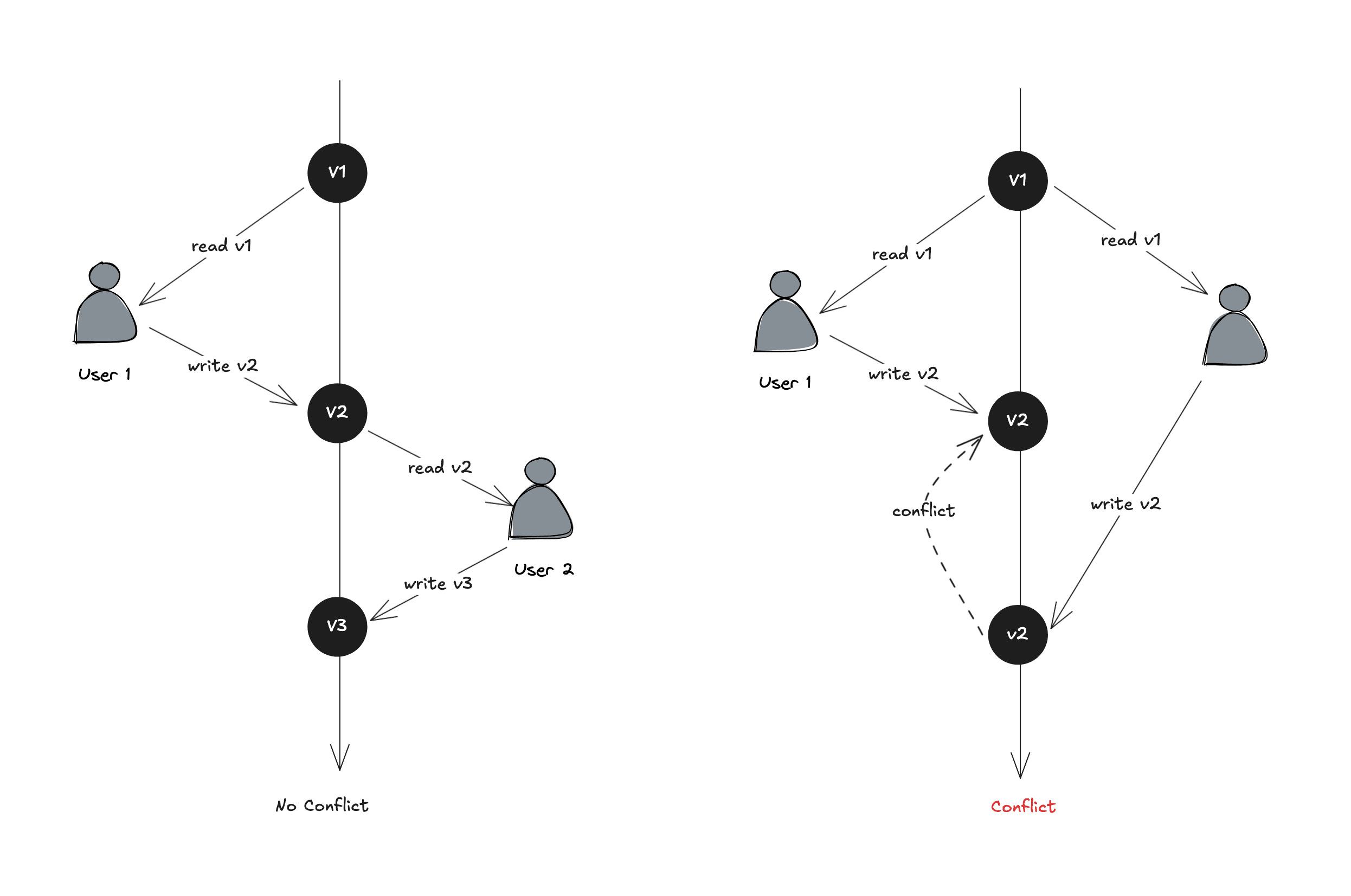
Optimistic Locking Illustration inspired from Alex Xu book
Here, a new column is added in the database table say of the inventory. Now, before a user modified a table row, the application reads the version number of the row. When it updates the row, the application increases it by 1 and writes it to the table. Now comes the check, a database validation check is put in place such that the next version number should be greater than the current version by 1. The transaction aborts if the validation fails and the user tries again.
The pros of this approach is that it is faster than the pessimistic locking because we do not lock the database, but the performance is degraded as the user has to retry again and again because at any time only one user will pass. So it is like you are retrying the payment method again and again till the time you get the successful message on say flipkart or amazon.
Locking at the Database Level
The safest place to enforce this lock is in the database itself. The goal is to combine the “read” (the check if we have sufficient products left to satisfy the order), and the “modify” (the update to either reserve or deduct) into a single, atomic operation that the database can execute safely.
Let’s think in terms of a SQL command, How can we write a single UPDATE statement that tells the database: DecreaseavailableQuantity and increasereservedQuantity, but only if the currentavailableQuantity is enough for the order?
1UPDATE Inventory
2SET
3    availableQuantity = availableQuantity - :quantity,
4    reservedQuantity = reservedQuantity + :quantity
5WHERE
6    productId = :productId
7    AND warehouseId = :warehouseId
8    AND availableQuantity >= :quantity;
The single command is powerful and it will only succeed if there is enough stock. If it succeeds, it returns 1 row affected. If there isn’t enough stock, the WHERE clause fails, and it returns 0 rows affected.
In our InventoryService, we can throw OutOfStockException, which tells the rest of the system that the order cannot proceed.
What if Bob was able to complete the payment but because of some reason, the payment failed, do we release the product that we reserved immediately? or do we give them some time to redo the payment?
On Amazon, you might have seen, when a payment fails they often say to retry the payment within 15m or so. Post that they might release that stock that they reserved for you for the other user to buy.
How are we going to implement that?
That would require some sort of timestamp when we are creating an order so that our cleanup process might identify those orders who have failed and their duration has exceeded the 15m.
For this, we can add reservedTill field to our Order. Now, say when the user clicks on checkout, our CheckoutService will call the OrderService to create an order with status PENDING_PAYMENT, and creates an orderId, meanwhile it also creates a cron job by running it in a different thread whose sole purpose is to tell theOrderService that times up, check whether the payment succeeded or not. After spinning up a cron job, it returns the orderId to theCheckoutService, which then passes the orderId to thePaymentService. When the payment succeeds/or fails, we get a callback from the service to the OrderService and we update the status of the order.
So say, Bob's payment failed, and Bob didn’t retry the payment, after the 15m have passed, our cron job will trigger us to check the status. The OrderService will then take the orderId (stored in the cron), check the status, if it is still failed, the OrderServicewill then call the InventoryService to release those reserved products otherwise do nothing.
Fault Tolerance
But what if the whole server goes down before it has a chance to call the release()?
This is a critical aspect of system design: fault tolerance. If the server running the cron job goes down, the cleanup task will be lost. To solve this, large systems use tools that are separate and highly reliable:
- Durable Job Schedulers: These are the services that store the scheduled jobs in persistent databases. If one server fails, another can pick up the job.
- Message Queues with Delayed Delivery: When an order is created, we send a message {"orderId": 241} to a message queue, telling it to deliver that message in 15m. A separate, simple worker service listens for these messages and calls release()method. The queue guarantees the message won’t be lost even if the worker is temporarily down.
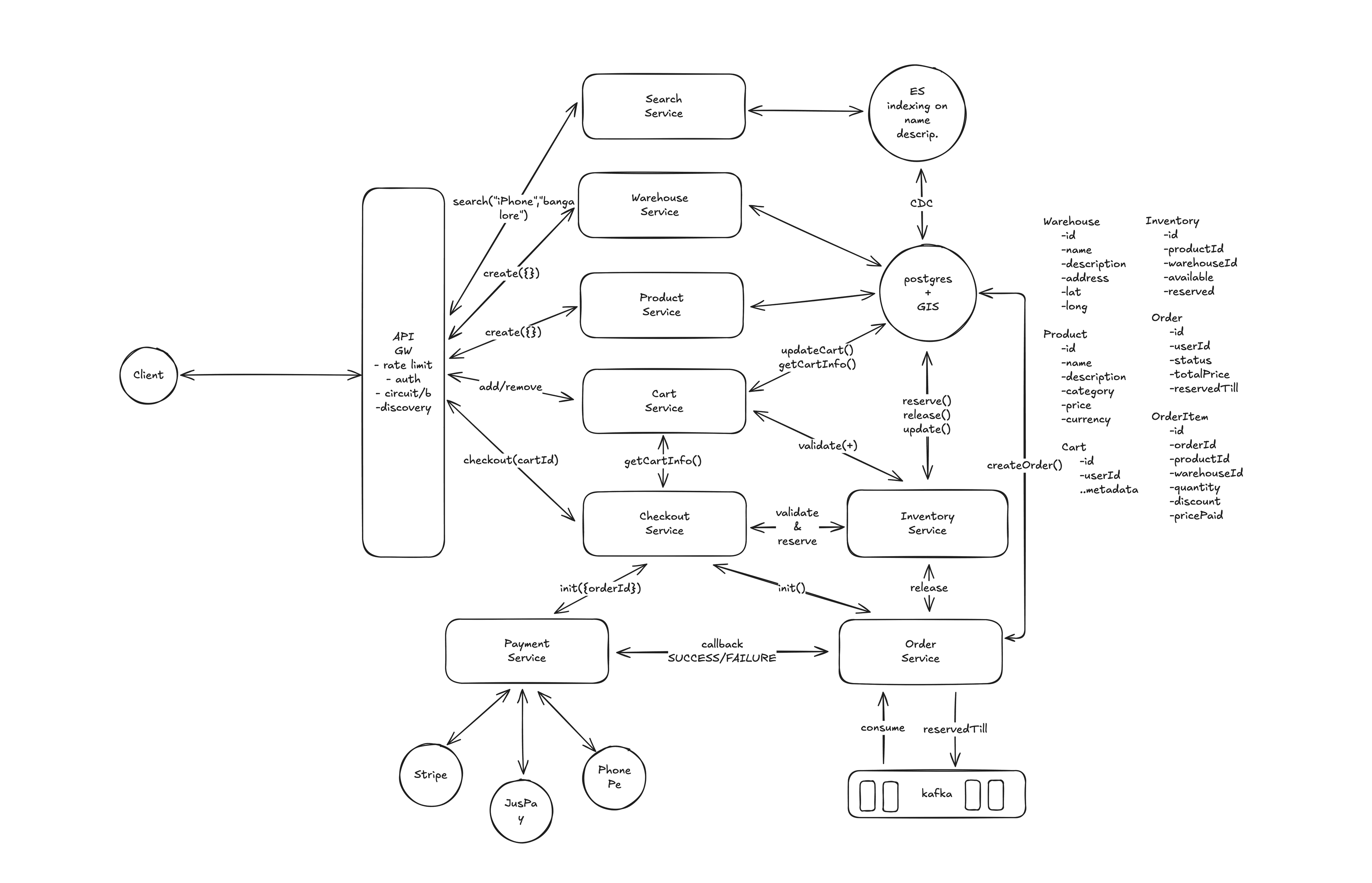
Let’s summarize the whole lifecycle of an order, from the moment a user clicks checkout (buy) to 15 minutes later.
When a user clicks “buy,” the system first attempts to atomically reserve the item in the database. This operation fails immediately with an out-of-stock error if the quantity is insufficient.
If the reservation is successful, the following process begins:
- An order is created and a 15-minute delayed task is pushed to a message queue.
- The user is directed to the payment screen to complete the purchase.
- The system then awaits the payment outcome:
- If payment is successful: The system receives a callback, clears the reserved stock, and finalizes the sale.
- If payment fails: The system does nothing immediately, leaving the stock reserved.
- After 15 minutes, the delayed task from the message queue is processed. It checks the order's status. If the order was never paid for, the task releases the reserved item back into the available inventory for others to purchase.
Conclusion
Here is a brief summary of the key design lessons we learned for building the inventory system:
- Structure with Clear Roles: We learned to build a maintainable system by separating data representations (Models like Product, Order) from the business logic that acts on them (Services like InventoryService).
- Solve Race Conditions at the Source: For the critical task of preventing overselling, the most reliable solution is to use the database's atomic capabilities (like a conditional UPDATE), which ensures a single source of truth.
- Design for Failure: To handle real-world issues like failed payments, we designed a fault-tolerant cleanup process using a delayed message queue. This prevents inventory from being locked indefinitely by incomplete orders.
- Combine Speed and Resiliency: The core pattern is handling the critical action (reserving stock) instantly and atomically, while delegating the follow-up action (cleanup) to a reliable, asynchronous process. This makes the system both responsive and robust.